

![Why Core Web Vitals Improvements Sometimes Stall [And How to Fix It]](https://cdn.wedevs.com/uploads/2026/03/Fix-Stalled-Core-Web-Vitals.png)
Why Core Web Vitals Improvements Sometimes Stall [And How to Fix It]
You've compressed images, deferred JavaScript, enabled caching, and your Lighthouse score finally looks respectable. So you wait a month, open Google Search Console, and… nothing. The same URLs are sitting in amber. The same frustrated client is asking what they're paying for.
This isn’t a rare edge case. As of late 2025, more than half of mobile websites still fail Core Web Vitals, with just 49.7% of mobile origins passing all three metrics. The problem usually isn’t that the optimisation work was wrong. It’s that something else is quietly undoing it, or the reporting mechanics are creating the illusion of no progress.
Here's what's actually going on.
1. The 28-Day CrUX Window Is Working Against You
The single biggest reason improvements appear to stall is boring and mechanical: it's how Google collects the data.
Core Web Vitals field data comes from the Chrome User Experience Report (CrUX), which aggregates real user metrics over a rolling 28-day window at the 75th percentile. The data itself is only delayed by about two days, but because each value spans a full 28-day collection period, your fix from today gets diluted by 27 days of older, slower data.
In practice, this means the first monthly report after a fix might show little change, even when the underlying change is substantial.
What to do: Set expectations before the work starts, not after. For faster feedback loops, use real user monitoring (RUM) tools that calculate the 75th-percentile daily metric rather than waiting for CrUX to catch up.
2. You're Optimising the Wrong Data

This catches out more people than you'd expect. A site owner runs PageSpeed Insights, sees a performance score of 40, optimises until it hits 90, and assumes the job's done.
But the performance score comes from Lighthouse (lab data). Core Web Vitals assessment uses CrUX (field data). These measure fundamentally different things.
| Lab Data (Lighthouse) | Field Data (CrUX) | |
| What it measures | Simulated load on one device | Real visits from thousands of users |
| Connection | Controlled throttled connection | Whatever your visitors actually have |
| Devices | Single emulated device | Every device type visiting your site |
| Content | Static page load | Personalised content, A/B tests, cookies |
| LCP element | May differ from the field | Reflects actual user experience |
| Used for rankings | No | Yes |
Some performance plugins illustrate the gap perfectly. They achieve impressive lab scores by delaying JavaScript execution until interaction. In a synthetic test, this looks fantastic. In the field, it can actually increase perceived latency because all that JavaScript then fires on top of the user's first click, which can hammer INP scores.
What to do: Stop chasing Lighthouse scores. When lab and field disagree, field data is what Google uses for rankings. Full stop.
3. Third-Party Scripts Are Undoing Your Work
You can optimise every image, minify every stylesheet, and preload every critical resource on a WordPress site. None of it matters if Google Tag Manager is loading 17 marketing tags, a live chat widget is injecting 400KB of JavaScript, and three analytics platforms are competing for main-thread time.
Third-party scripts are the silent assassins of CWV progress. They often:
- Execute extensive JavaScript that blocks the main thread
- Come with payloads far larger than necessary
- Rely on external servers that introduce unpredictable latency
- Load globally across every page, regardless of whether that page needs them
The problem compounds on WordPress, where each plugin can inject scripts and styles site-wide.

What to do: Audit ruthlessly. Use Chrome DevTools Performance panel to identify which scripts are hogging the main thread. Asset management plugins let you selectively disable scripts on a per-page basis. For essentials like live chat, use a facade pattern: show a static placeholder that only loads the full widget when clicked.
4. INP Is the New Bottleneck (And It's Harder to Fix)
When Google replaced First Input Delay with Interaction to Next Paint on March 12, 2024, the goalposts moved significantly. FID only measured the delay on the very first interaction. INP measures all interactions throughout the entire session and reports the worst-case responsiveness.
The impact was immediate. Mobile pass rates dropped noticeably when the metric switched over, and the gap between desktop and mobile widened.
INP is particularly brutal for WordPress sites running WooCommerce, complex filters, or interactive forms. Pages might load quickly (good LCP) and stay visually stable (good CLS), but the moment someone clicks “Add to Cart” or submits a contact form, the main thread locks up and INP fails.
What to do: Lab tools can't reliably measure INP. Install the Web Vitals Chrome extension and manually test real user flows: clicking navigation, submitting forms, and interacting with filters. Break any JavaScript task over 50ms into smaller chunks using requestIdleCallback or async functions.
5. The 75th Percentile Trap
CrUX reports at the 75th percentile. That means 75% of your visitors need a good experience before Google considers the metric as passing. The remaining 25% can be significantly worse without showing up in the headline number.
The flip side: a relatively small percentage of users with poor connections can anchor your score below the threshold. Visitors on 3G in rural areas, users on older Android devices, or traffic from regions far from your server can drag the 75th percentile down even when the site flies for everyone else.
Here's how the thresholds break down:
| Metric | Good | Needs Improvement | Poor |
| LCP | ≤ 2.5s | 2.5s – 4.0s | > 4.0s |
| INP | ≤ 200ms | 200ms – 500ms | > 500ms |
| CLS | ≤ 0.1 | 0.1 – 0.25 | > 0.25 |
Remember: your site needs to hit “Good” on all three metrics at the 75th percentile to pass. Failing just one is enough to fail overall.
What to do: Use CrUX Vis or a RUM tool to view the full distribution, not just the P75 headline number. If you see a long tail of poor mobile experiences, investigate whether they're coming from specific regions (CDN issue) or specific device types (JavaScript execution issue).
6. WordPress Plugin Bloat Is a Cumulative Problem
No single plugin typically causes a CWV failure on its own. The damage is cumulative. Twenty plugins, each adding a small JavaScript file and CSS stylesheet, means twenty extra HTTP requests and potentially hundreds of kilobytes of code that need to be parsed on every page load.
The usual suspects:
| Plugin Type | The Problem |
| Social sharing buttons | Loading sharing APIs for 5+ platforms on every page |
| Slider/carousel plugins | Animation libraries are loaded whether the page has a slider or not |
| Contact form plugins | Scripts are enqueued site-wide for a form that exists on one page |
| Page builders | Full framework loaded on every page, not just pages using it |
| Analytics/tracking | Multiple overlapping scripts measuring the same things |
Even moving to hosting with SSD storage and server-level caching can offset some of the damage, but it won't fix the root cause. You still need to clean up the plugin sprawl.
What to do: Deactivate plugins one at a time and measure the impact in PageSpeed Insights. Use conditional loading to only enqueue assets on pages where they're needed. Choose lightweight themes that produce cleaner output. Ask yourself: could this plugin's job be done with 10 lines of custom code instead of an entire framework?
7. Your Hosting Is the Ceiling You Can't Optimise Past
All the front-end optimisation in the world can't overcome a fundamentally slow server. If your Time to First Byte is consistently above 800ms, you're starting the LCP race with a handicap that no amount of image compression or lazy loading can overcome.
Industry analysis shows that roughly half of WordPress sites failing Core Web Vitals can trace their problems back to poor server response times, typically on shared hosting without edge caching or CDN support.
This is where hosting quality becomes the deciding factor. Platforms built specifically for WordPress — with LiteSpeed caching, NVMe SSD storage, PHP 8.x support, and CDN integration baked in — eliminate the TTFB bottleneck created by shared hosting. Managed WordPress hosting from providers like Hosting.com addresses this at the source, giving you a fast baseline that front-end optimisations can actually build on.
What to do: Test your TTFB using Chrome DevTools Network panel. If it's consistently above 800ms, no front-end fix will get you over the line. Upgrade to managed WordPress hosting with server-level caching, implement a CDN as standard, and ensure you're running PHP 8.x.
The Diagnostic Sequence
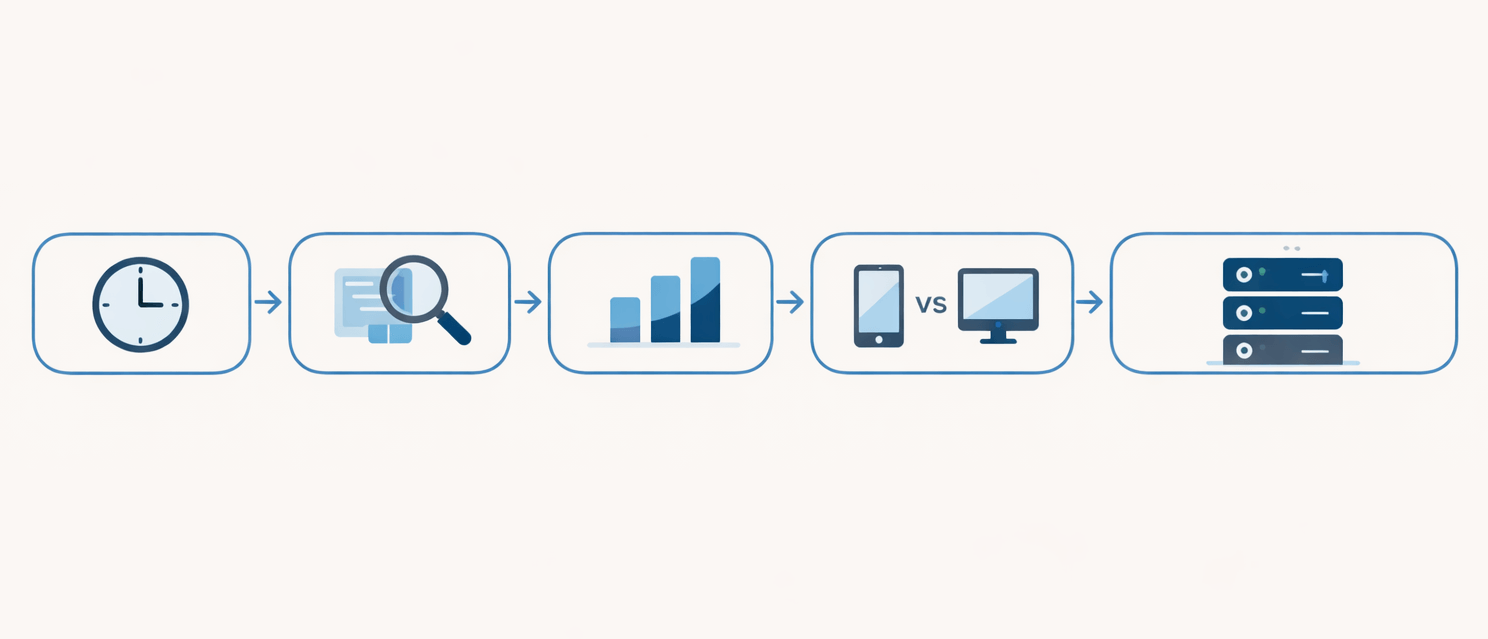
When CWV improvements stall, work through this in order. Each step eliminates a category of problem before moving to the next.
- Check the timeline. Has it been 28+ days since changes went live? If not, CrUX hasn't caught up yet. Wait, and monitor with RUM tools in the meantime.
- Compare lab and field. Good Lighthouse scores but poor CrUX? Real-world factors are at play that your lab tests aren't capturing.
- Identify the failing metric. Is it LCP, INP, or CLS? Each has a completely different diagnostic path. Don't apply generic fixes.
- Check mobile vs desktop. Desktop passes but mobile fails? Likely JavaScript execution time on lower-powered devices or mobile-specific layout shifts.
- Audit TTFB. Above 800ms? Fix the server first. Everything downstream depends on it.
- Review third-party impact. Chrome DevTools Performance panel will show you exactly which scripts are blocking the main thread.
Stop Guessing, Start Diagnosing
Core Web Vitals don't stall randomly. There's always a specific, diagnosable reason: the CrUX window creating an illusion of no progress, a mismatch between lab and field, third-party scripts sabotaging your work, or hosting that's simply hit its ceiling.
The shift that makes the difference is moving from generic optimisation to targeted diagnosis. Don't throw caching plugins at a problem caused by INP failures. Don't compress images when the real culprit is a chat widget loading 400KB of JavaScript on every page.
Measure with field data. Diagnose with lab tools. Fix the specific bottleneck. Give CrUX time to reflect the change. That's the cycle that breaks through stalled scores and delivers real, lasting performance improvements for WordPress sites.
Also Check – 7+ Ways on How to Improve Domain Authority of Your Website

