

How to Prevent Spam Orders in WooCommerce: Ultimate Guide – A Beginners Guide
Are you looking for an easy tutorial to prevent spam orders in WooCommerce? You are in the right place. In this guide, we will show you different ways to prevent spam orders in your online store.
Spam orders are a growing issue for WooCommerce store owners. These fake or fraudulent orders often come from bots or individuals using stolen information. While they may seem harmless at first, they can have a serious impact on your business.
Fake orders waste valuable resources, such as time and money. They can also lead to-
- shipping mistakes,
- inaccurate stock levels, and
- even customer dissatisfaction.
The more spam orders your store receives, the harder it becomes to distinguish real customers from fraudulent ones.
Let's check how you can prevent all the spam orders in your eCommerce store!
Understanding Spam Orders in WooCommerce
Spam orders are fake purchases that are typically made by bots, fraudsters, or individuals using stolen information.
These orders don’t result in legitimate sales and are primarily intended to disrupt your store’s operations or cause financial damage. Common signs of spam orders include:
- Fake customer data: Fake names, email addresses, or phone numbers that don’t correspond to real individuals.
- Low-quality orders: Orders that seem too random or unreasonably large for legitimate customers.
- Automated bot attacks: Bots that automatically fill out order forms and make fake purchases to exploit vulnerabilities in your checkout process.
These fake orders can flood your store with non-paying customers, making it harder to identify real ones.
How Spam Orders Affect Your WooCommerce Store-
- Increased Workload: Handling spam orders requires time and resources to investigate, cancel, and block the offenders. This adds unnecessary strain on your order management system and customer service team.
- Lost Revenue: If you’re offering perks like free shipping or discounts, you might lose money fulfilling fraudulent orders. Additionally, you may experience lost sales if your team gets overwhelmed with spam orders, and legitimate customer orders are delayed or overlooked.
- Risk of Fraud: Spam orders are frequently associated with fraudulent activity. Fraudsters use fake payment methods, stolen credit card information, or bots to place orders. This can lead to chargebacks, disputes, and potential loss of your payment processor’s trust.
- Damage to Customer Trust: When spam orders go undetected, it can affect your store’s reputation. Customers may feel uneasy if they notice shipping delays, out-of-stock products, or confusion in the order process, all of which can harm their trust in your brand.
Understanding how spam orders manifest and how they can disrupt your business is crucial to effectively preventing them. In the next section, we'll explore several practical strategies to help protect your WooCommerce store.
Necessary Strategies to Prevent WooCommerce Spam Orders
We are at the business end of our article. Now we will tell you the ways you can prevent WooCommerce spam orders-
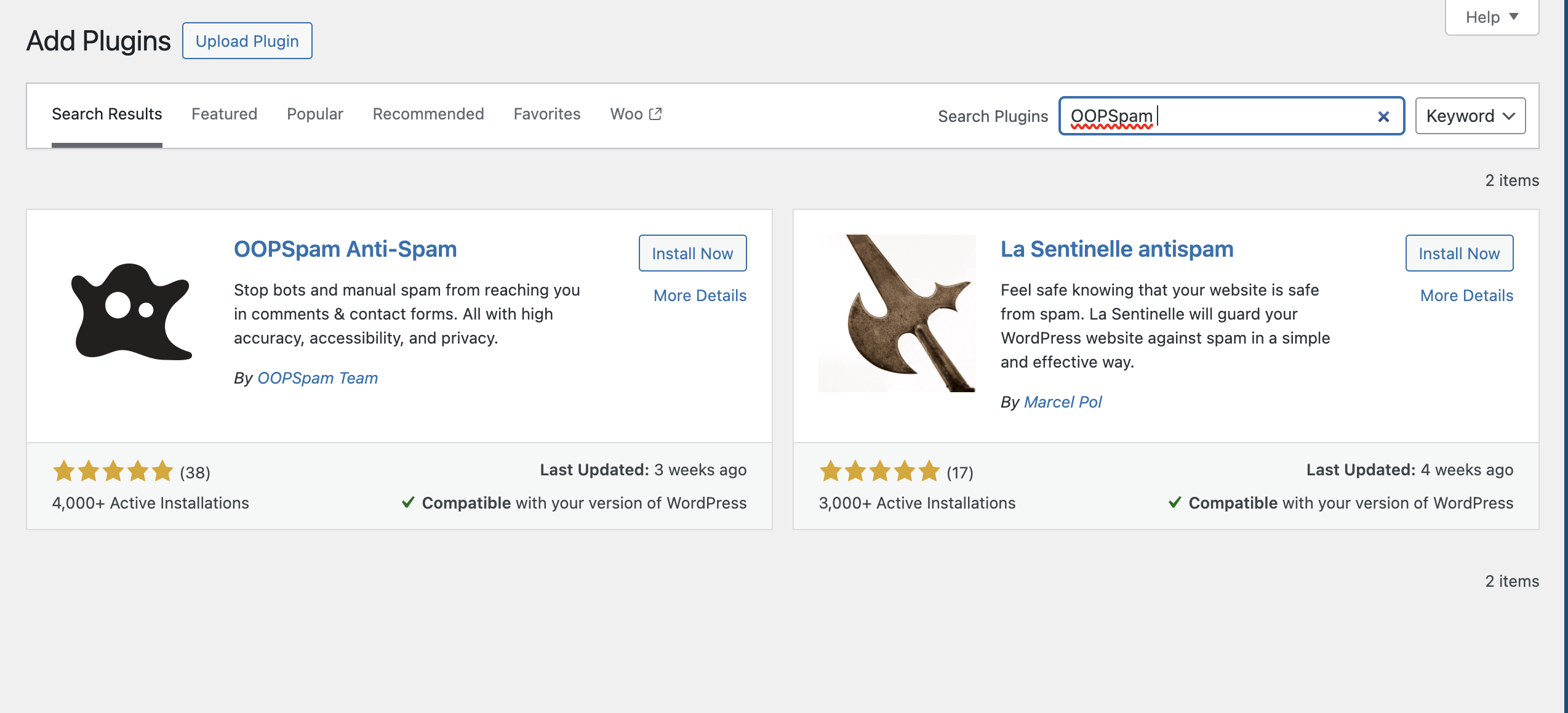
1. Using OOPSpam for Real-Time Spam Detection
One of the most effective tools to prevent spam orders in WooCommerce is using OOPSpam, a plugin that helps detect and block spam in real time. OOPSpam utilizes machine learning algorithms to analyze incoming orders and automatically block fraudulent ones before they are even processed.
- Key Features:
- Real-time detection: OOPSpam actively scans each order for suspicious activity and blocks spam instantly.
- Country and language filters: You can filter orders based on the customer's country and preferred language to reduce spam from high-risk regions.
- Sensitivity adjustments: Fine-tune the plugin’s sensitivity to adapt to the specific needs of your store.
- Honeypot integration: OOPSpam integrates with honeypot fields, helping trap bots without affecting your users’ experience.
Installing and configuring OOPSpam on your WooCommerce store can significantly reduce the number of spam orders, ensuring a smoother and safer checkout experience.
2. Set Up CAPTCHA on Checkout Forms
CAPTCHA (Completely Automated Public Turing test to tell Computers and Humans Apart) is a simple yet powerful tool to prevent bots from placing orders. By requiring customers to complete a CAPTCHA challenge before submitting an order, you can filter out automated spam bots.

Popular CAPTCHA Options:
reCAPTCHA: Offered by Google, this widely used service prevents bots from submitting forms and making fake orders. It comes with both visible (e.g., “I’m not a robot” checkbox) and invisible options (which appear only when suspicious behavior is detected).
hCAPTCHA: A similar alternative to reCAPTCHA, hCAPTCHA offers a more privacy-focused solution that helps prevent spam while also contributing to the improvement of AI.
Steps to integrate CAPTCHA in WooCommerce–
- Install a CAPTCHA plugin (e.g., “reSmush.it” for reCAPTCHA or “hCaptcha for WooCommerce”).
- Configure the plugin settings to enable CAPTCHA on your checkout and registration forms.
- Test to ensure the CAPTCHA is functioning correctly without affecting the user experience.
3. Enable User Registration Before Checkout
Requiring users to register before placing an order is another effective way to reduce spam. Bots often place orders without any intention of completing them, and by requiring registration, you make it more difficult for spam accounts to be created.
Why this works: When customers register for an account before completing checkout, they are more likely to be legitimate buyers. Plus, you’ll have more control over their data, making it easier to track and identify suspicious activity.
How to set up user registration for orders in WooCommerce:
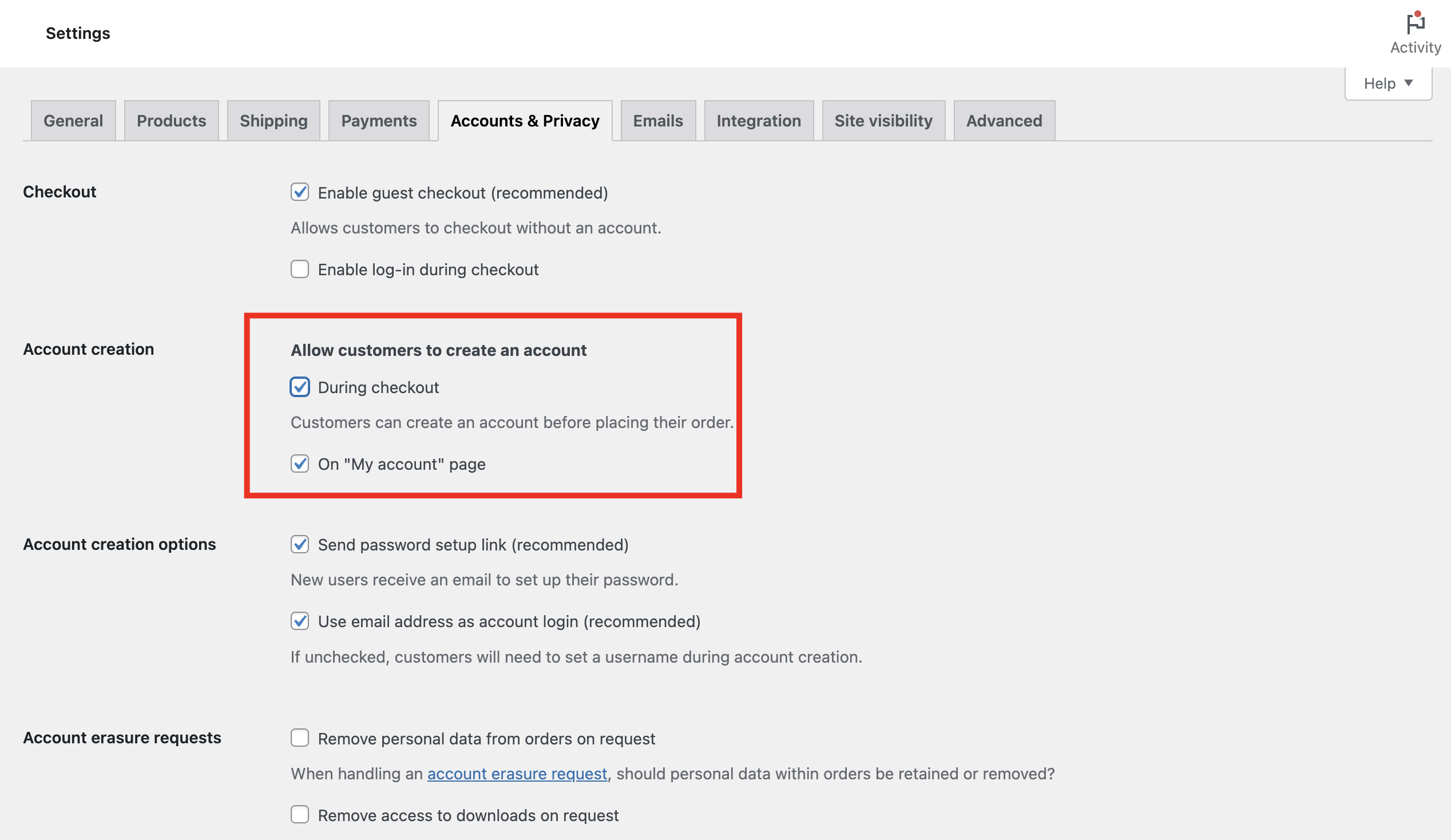
- Go to WooCommerce > Settings > Accounts & Privacy.
- Enable the option to allow customers to create an account during checkout.
- Make it mandatory for customers to register before completing the checkout process.
This not only deters spam but also helps build a more trusted and engaged customer base.
4. Blocking Suspicious Countries
Another way to fight spam orders is by blocking high-risk countries associated with fraudulent activities. WooCommerce allows you to limit the countries you sell to, which can reduce the volume of spam orders.
How to block suspicious countries:
- Go to WooCommerce > Settings > General.
- Under the Shipping Location(s) and Selling Location(s), select only the countries you want to sell to.
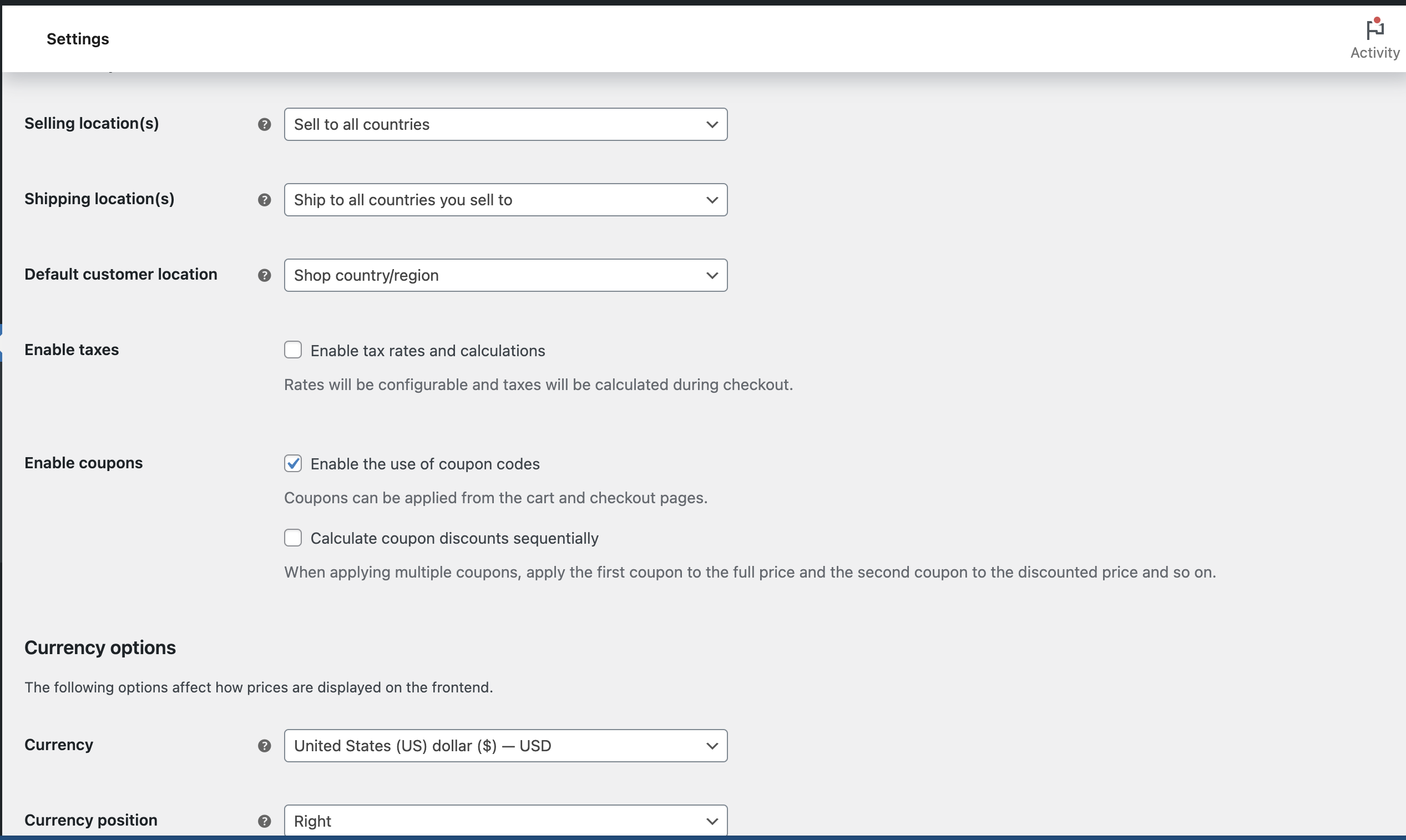
Consider excluding regions known for higher spam activity or where you do not offer shipping.
Blocking orders from countries with a high number of fake transactions can significantly reduce spam. However, be careful not to limit sales too much if you want to reach a global audience.
5. Using Honeypot Fields
A honeypot is a hidden form field that is invisible to human visitors but visible to bots. When a bot fills out the honeypot field (which they do automatically), you can identify the order as fraudulent and block it.
How honeypots work: Bots are designed to fill out all form fields, including hidden ones. Humans can’t see these fields, so they don’t fill them in, but bots will. By detecting these actions, you can flag the order as spam.
Simple implementation in WooCommerce:
Many anti-spam plugins, like OOPSpam, automatically add honeypot fields. Alternatively, you can manually integrate honeypots using form plugins like Gravity Forms or Contact Form 7.
6. Reviewing and Blocking Fraudulent Email Addresses and Domains
Spam orders often come with fake or suspicious email addresses. Tools like Email Verification plugins can help you identify and block fraudulent emails before processing orders.
How to detect spam email addresses: Use services that can verify whether an email address is from a disposable domain or if it has been flagged for spamming activity. Some plugins also let you block common spam email domains automatically.
Steps to implement email verification:
- Install an email verification plugin for WooCommerce.
- Configure it to check email addresses during registration or checkout.
- Block or flag suspicious email addresses for review.
By combining these methods, you can significantly reduce the number of spam orders and ensure a smoother, more secure experience for your legitimate customers.
Advanced Techniques for Spam Protection
If you want to go one level further and add more advanced techniques to prevent WooCommerce spam orders, then you can try these-
Implementing Third-Party Anti-Spam Plugins
For additional protection against spam orders, consider using third-party anti-spam plugins. These plugins offer more advanced features, additional security layers, and integrations that enhance your store’s ability to prevent fraud and spam.
Examples of Anti-Spam Plugins:
- WooCommerce Anti-Spam: A lightweight plugin that blocks spam registrations, orders, and reviews using IP address, user-agent, and email checks.
- Akismet Anti-Spam: Although originally designed for WordPress blogs, Akismet can also help prevent spam in WooCommerce by filtering out fake orders, registrations, and reviews.
- Anti-Spam Bee: A powerful WordPress plugin that also works to detect and block fraudulent or spammy interactions across your store.
Why use third-party anti-spam plugins?
- These plugins often come with built-in machine learning models and fraud detection features that adapt to new spam tactics over time.
- They may also offer automated spam blocking, reducing the need for manual intervention and making your store more secure without adding much extra effort.
Make sure to test these plugins before going live, ensuring they don't conflict with other plugins or slow down your checkout process.
IP Address and Device Fingerprinting
Another advanced method to protect your store from spam orders is IP address and device fingerprinting. By tracking the IP addresses of users who place orders and using device fingerprinting technology, you can identify patterns in fraudulent activity.
How it works:
IP Address Tracking: Identifies and blocks orders coming from suspicious or blacklisted IP addresses associated with spammers or fraudsters.
Device Fingerprinting: Collects unique identifiers from a user's device, such as browser type, operating system, and hardware. This information helps track users who may attempt to place fraudulent orders using different accounts or IPs.
Benefits of IP and Device Tracking:
- Fraud detection: Blocking known fraudulent IPs and devices can prevent repeated spam orders from the same source.
- Enhanced security: These tools can help identify and block bots or automated systems trying to bypass your other anti-spam measures.
- Improved user experience: Genuine customers won’t be affected by these tracking measures, but you’ll prevent bots from causing disruptions.
How to implement:
There are plugins available that allow you to implement IP blocking and device fingerprinting. For instance, the Fraud Prevention Plugin for WooCommerce allows you to track and block suspicious IP addresses and devices automatically.
By using IP address and device fingerprinting, you can go beyond simple spam detection and catch more sophisticated fraud attempts.
Let me know if you'd like me to make any changes, or if you're ready for the next section!
Regularly Monitor and Update Your Spam Protection Measures
Spam protection is not a one-time setup—it requires ongoing monitoring and updates to stay effective. As spammers and fraudsters constantly evolve their tactics, your spam prevention tools need to adapt as well. Failing to update your anti-spam measures can leave your WooCommerce store vulnerable to new types of attacks.
- Adapting to New Spam Techniques: Fraudsters often come up with new ways to bypass traditional security methods. Regular updates ensure that your spam protection tools stay ahead of emerging threats.
- Improved Performance: Updates can also optimize the performance of your security measures, ensuring they run smoothly without slowing down your store’s checkout process.
- Ensuring Compatibility: WooCommerce and WordPress plugins are frequently updated. If your anti-spam solution isn’t updated to stay compatible with these changes, it could cause conflicts or security loopholes.
So you can-
- Set automatic updates for your anti-spam plugins to ensure they’re always running the latest version.
- Monitor spam trends and adjust your settings as needed, particularly if you notice an increase in spam activity.
Using WooCommerce Logs for Spam Activity Tracking
WooCommerce logs provide valuable insights into your store's activity, including suspicious orders that could indicate spam. By reviewing your logs regularly, you can track potentially fraudulent behavior and take action before it becomes a bigger problem.
How to Use WooCommerce Logs:
- Go to WooCommerce > Settings > Advanced > Debugging, and enable the logging feature to start tracking suspicious activities.
- Check logs for unusual patterns, such as multiple orders from the same IP address or rapid repeated attempts to place orders from the same email or shipping address.
- When you spot suspicious activity, you can block the customer, flag the order, or even issue a refund if you suspect fraud.
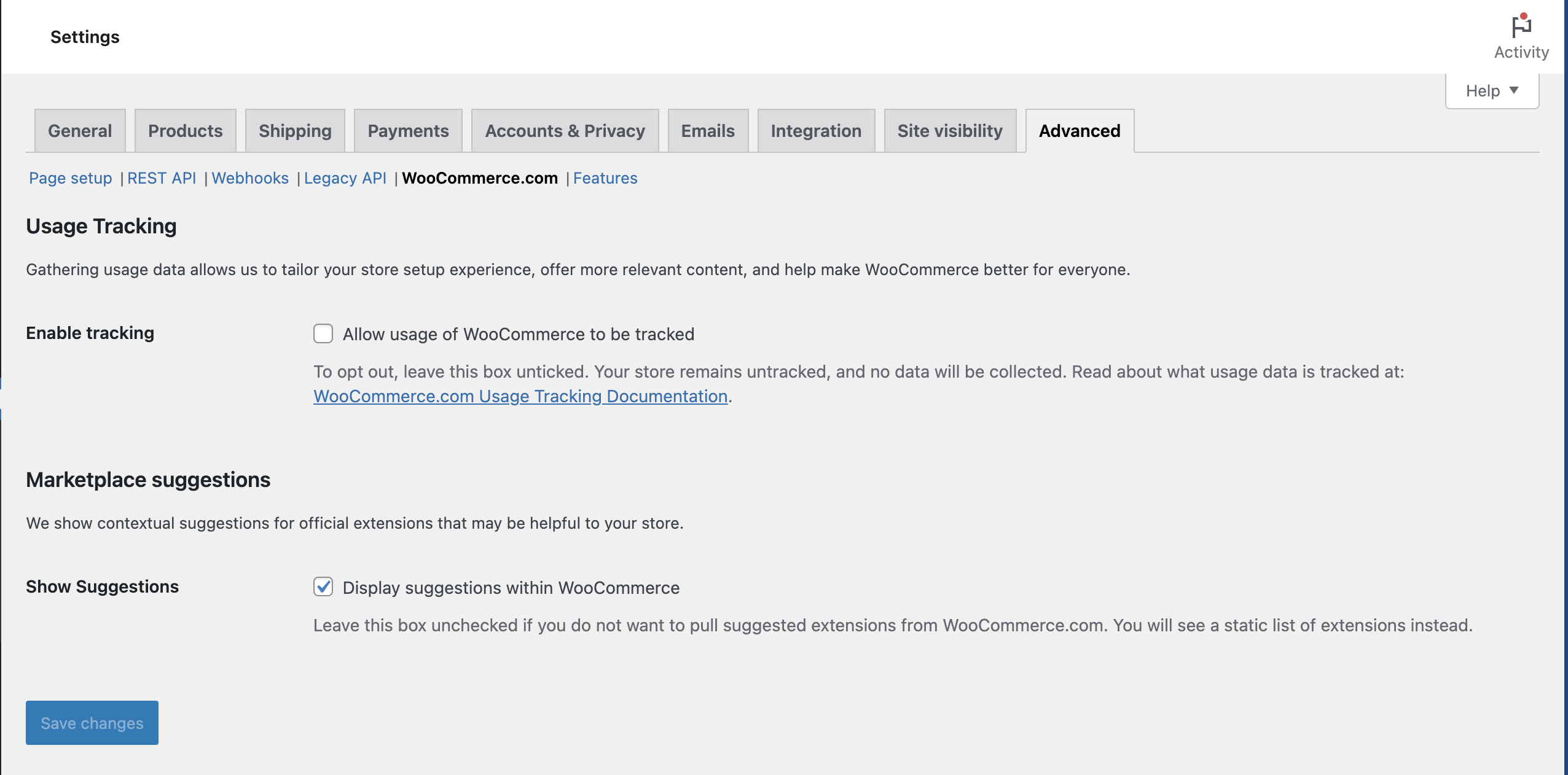
Regularly monitoring these logs helps you stay proactive in identifying and addressing spam orders quickly.
Tips for Using Logs Effectively:
- Combine logs with IP tracking to identify recurring spammy behavior.
- Set up alerts for unusual order activity to stay on top of potential threats in real-time.
By keeping a close eye on your WooCommerce logs, you can catch potential spam orders before they cause significant disruptions to your store.
Prevent Spam Orders and Deal with the Real Ones!!!
Spam orders can create serious challenges for WooCommerce store owners. However, with the right strategies, you can effectively prevent these disruptions.
Key methods for preventing spam orders include using OOPSpam for real-time detection, implementing CAPTCHA on checkout forms, requiring user registration before checkout, and blocking suspicious countries associated with fraud.
Regularly monitor and update your spam protection measures. As spammers constantly evolve their tactics, keeping your tools up to date helps you stay ahead of emerging threats.
By combining these strategies, you not only safeguard your store from spam but also improve the experience for legitimate customers.
Proactive spam protection is key to maintaining a smooth, efficient, and fraud-free WooCommerce store.

