Search for how to build a site like Medium and you get theme lists. Install one, and you have a blog that looks like Medium and works nothing like it.
Someone on Quora put it well. A Medium-style theme gives you a one-person blog with the right look. Medium is a multi-user platform where every writer has their own account.
Themes handle the look. This guide handles the rest, which is letting other people write on your site without ever touching your dashboard.
TLDR
- Medium is six things working together, and a theme covers only one of them.
- Writers need their own accounts, a writing form, a dashboard, and a profile.
- User Frontend does all four in its free version.
- Stories can wait for your approval before they publish.
- The paywall and full author profiles need the Pro version.
- You can launch with free and add the paid layer once writers show up.
Know What Actually Makes Medium Work
Strip Medium down and six pieces do the work.
- Anyone can sign up and become a writer
- Writers publish through a clean form, not a backend
- Every writer has a profile with a photo and a bio
- Writers manage their own stories from one place
- Editors approve stories before readers see them
- Some stories sit behind a membership
A theme gives you the reading experience. The other five turn a blog into a platform. All five live on the writer side, which is why theme roundups keep missing the point.
User Frontend passed 20,000 active installs on WordPress.org. Source, the User Frontend listing on WordPress.org.
Set Up the Foundation for Your Medium-Style Platform
Three steps, and everything later depends on them.
- Install the free WP User Frontend plugin.
- Click Install WPUF Pages.
- Check your page assignments.
Install the plugin and create the pages
Go to Plugins, then Add New, and search for User Frontend. Once you turn it on, a new menu appears in your sidebar.
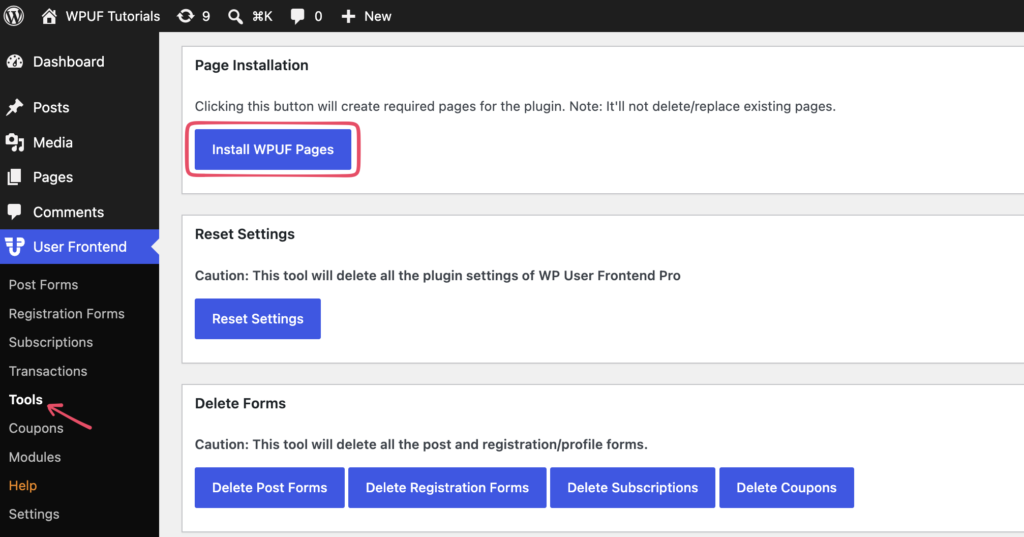
Click Install WPUF Pages, which sits in the installer and on the Tools screen. It builds the Dashboard, Account, Edit, and Login pages with the right shortcodes already in them, plus a User Directory page. Skip this and you spend an afternoon wondering why edit links do nothing.
Check the page assignments
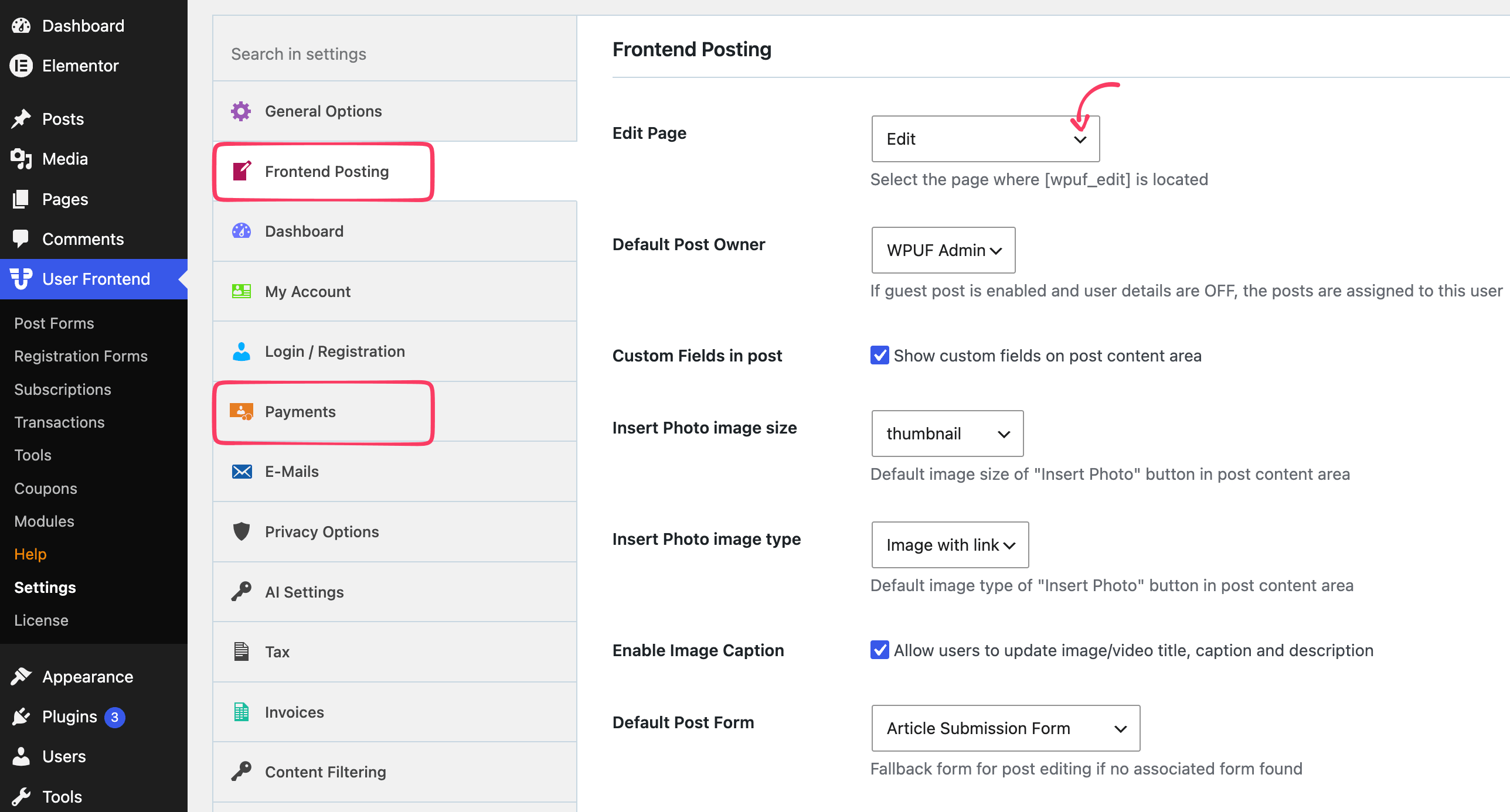
Open Settings under the User Frontend menu. The Edit page sits on the Frontend Posting tab. Payment pages sit on the Payments tab, which matters later if you add a paywall.
Let Writers Sign Up and Write
Two pieces here. A way in, and a way to publish.
Add a signup page
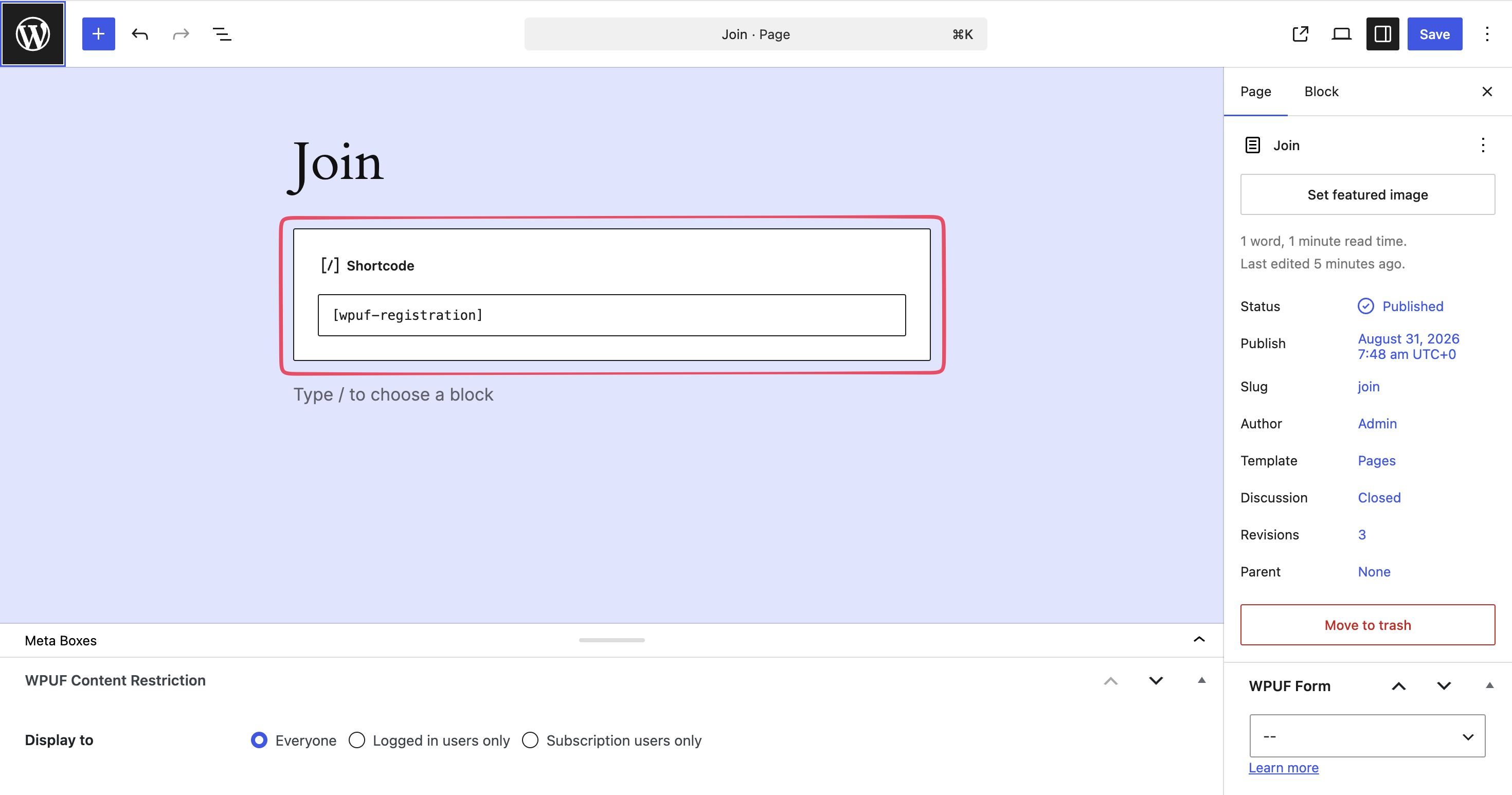
Drop [wpuf-registration] on a page called Join, which is the quickest way to create a registration form. New writers create an account without seeing wp-admin.
Pair it with [wpuf-login] on a login page so the whole flow stays on your site.
The free signup form uses default and template fields. Want to ask for more at signup, like a Twitter handle or a writing sample? Custom registration forms are a Pro feature.
Build the writing form
Go to Post Forms and start from the Post template, or describe the form you want and let the AI builder create it. AI generation is free for post forms.
A Medium-style story form needs very little. Post Title, Post Content, Post Excerpt, Featured Image, and Post Taxonomy for topics. All five are free fields.
Then paste the form shortcode on a page called Write, using [wpuf_form id="123"] with your own form ID.
Keep the form short. Every extra field costs you submissions, and Medium's own editor asks for almost nothing beyond a title and a body.
Give Writers a Dashboard and a Profile
This is the difference between a submission form and a platform. Writers need somewhere to come back to.
Add the dashboard
A user account dashboard is what keeps writers coming back.
Install WPUF Pages already made this page. It runs on [wpuf_dashboard] and gives a logged-in writer a view of their own stories.
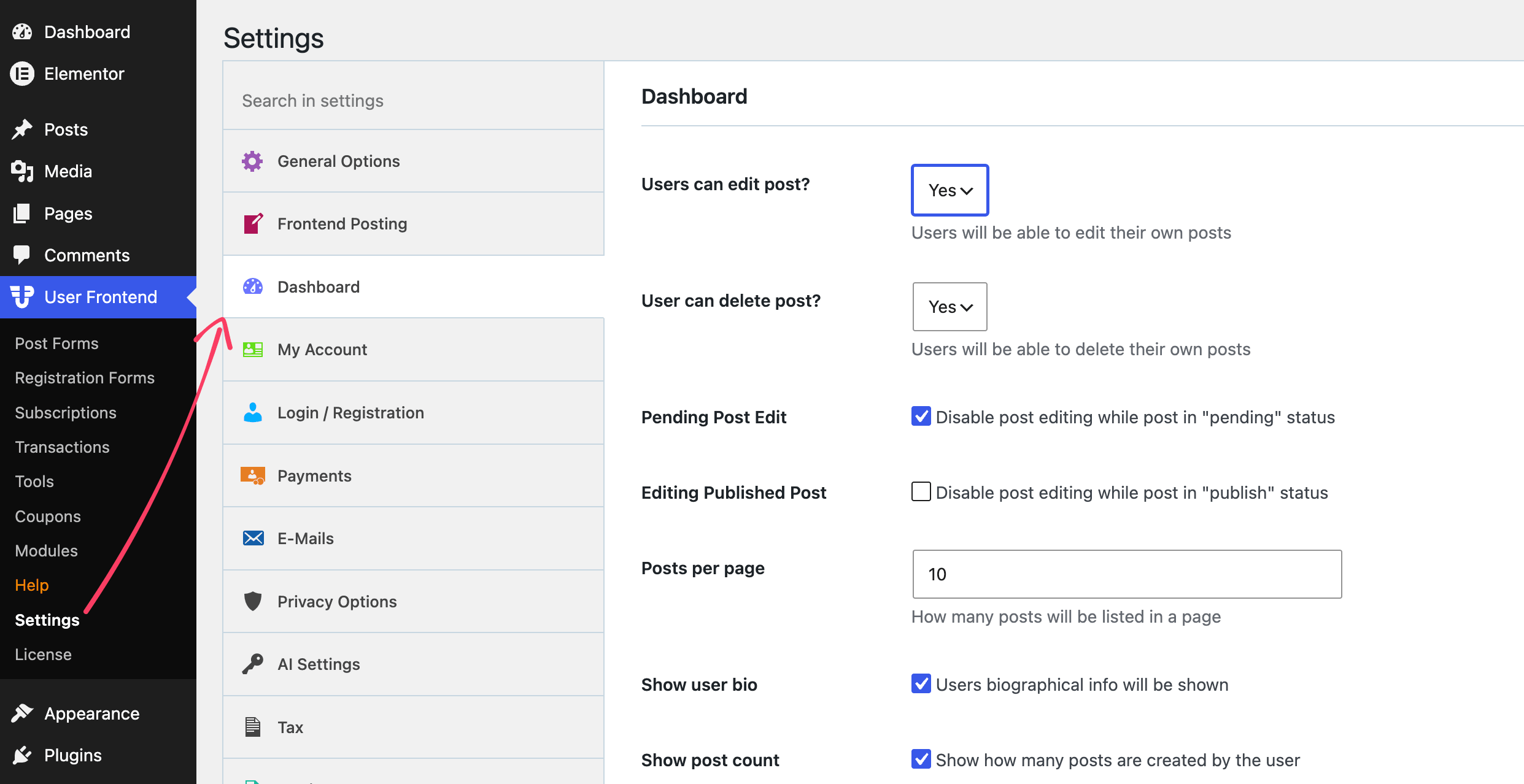
Free includes frontend post editing by the author. So a writer fixes their own typo without emailing you. On a site with twenty contributors, that one detail decides how much of your week disappears into small corrections.
Add profiles
Free gives writers a frontend profile screen through [wpuf_account], using default fields.
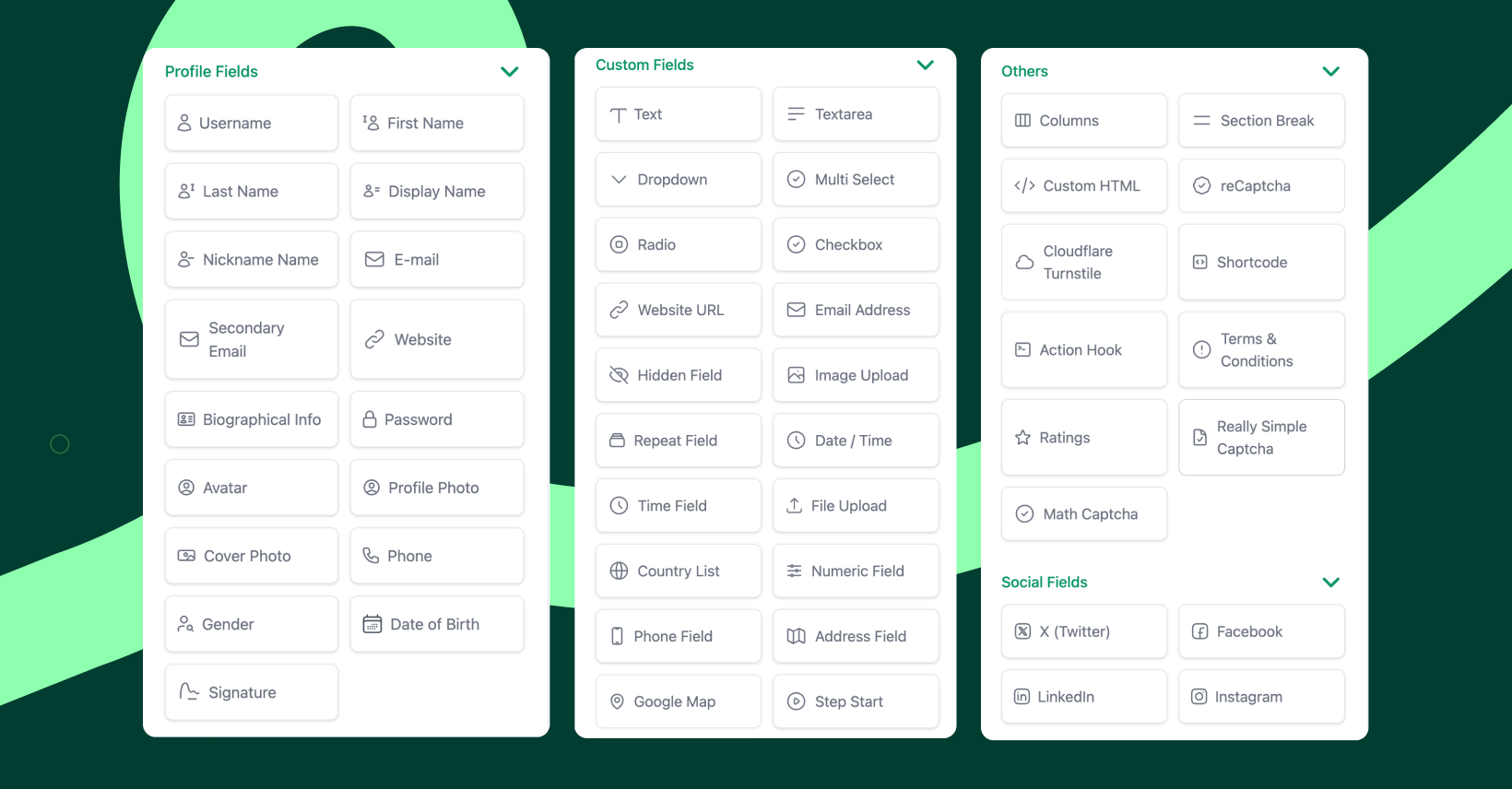
Real author profiles need more. Avatar, cover photo, user bio, display name, and social links are all Pro fields. So are unlimited custom fields. If author bios matter to your publication, budget for Pro now rather than rebuilding later.
Review Stories Before They Publish
Set the post status on your form to Pending. Nothing goes live until you approve it in wp-admin.
You can run more than one form with different rules. A public Write page stays moderated, while a separate form for trusted writers publishes right away. Free also lets you limit posting to specific roles under Settings, then Frontend Posting.
Add Cloudflare Turnstile or reCAPTCHA as a field. Both are free, and an open writing form attracts bots within days.
Add a Paywall for Member-Only Stories
Medium locks some stories behind membership. This is the one part of the build that genuinely needs Pro.
Free covers the money side in basic form. It supports subscription packs and pay-per-post, with PayPal or bank transfer. Add [wpuf_sub_pack] to a pricing page and [wpuf_sub_info] where members check their plan. Payments show up under Transactions.
What free cannot do is lock a story. Content restriction is Pro only. With Pro you gate a whole post by role or subscription, or wrap part of one so readers get the opening and hit a wall.
[wpuf_restrict type="subscription" pack_ids="12,15"]Members only[/wpuf_restrict]
Stripe is a Pro module as well, so plan around PayPal if you launch on free.
Help Readers Find Writers
Medium sends readers to writers, not just to stories. A directory does the same job.
Free ships a basic searchable user directory through [wpuf_user_listing]. That covers a small publication.

Pro adds more layouts, filters, unlimited directories, and SEO controls for profile pages. Those arrive on the Professional plan. They earn their keep once you pass fifty or so writers, because search is the only way readers find anyone after that.
Know What Free Covers and What Needs Pro
You can launch a working publication on free. Here is the honest split.
Free handles registration with default fields, the writing form, frontend editing, the writer dashboard, basic profiles, moderation, spam protection, a basic directory, subscription packs, and PayPal.
Pro adds content restriction for the paywall. It also adds full author profiles, custom signup forms, Stripe, social login, coupons, better directories, and post expiration.
Pro is an add-on rather than a replacement, so the free plugin stays installed underneath it. The full free versus Pro breakdown covers the rest.
Frequently Asked Questions on How to Create Your Own Medium with WordPress
Do writers get access to my admin area?
No. Writers work entirely from your site's front end. That matters, because the Contributor user role lets people into wp-admin, where they can browse other posts. Test your own setup before launch to confirm each writer sees what you expect.
How do I pay writers?
User Frontend collects money from readers rather than paying it out to writers. Payouts need a separate tool, so plan that side before you promise anyone a revenue share.
Will this work with my existing theme?
Yes. Everything runs through shortcodes and Gutenberg blocks on normal pages. Your theme controls how stories look. The plugin handles accounts and submissions.
Can I import stories from Medium?
Medium lets you export your own stories, and importer tools exist for WordPress. Check what is current before you rely on it. Work written by other people on Medium belongs to them, so start fresh rather than moving anyone else's writing.
What if a writer leaves?
Their stories stay published under their name. Change the post author in wp-admin if you need to reassign a piece.
Do I need multiple forms?
One is enough to launch. Add more when different groups need different rules, like a moderated public form beside an open one for staff.
Start With One Form and One Writer
Build the signup page, the writing form, and the dashboard. Invite one writer and walk through it yourself as if you were them. You will find the rough edges faster that way than from any checklist.
Add profiles and the paywall once people are actually writing. A publication with no writers does not need a membership tier, and the free version carries you well past your first dozen contributors.
If you are still deciding between building this and posting on Medium itself, our WordPress versus Medium comparison covers that choice.
Get User Frontend free from WordPress.org, or see what Pro adds.