Type what you need in plain language and WP User Frontend turns it into a working frontend form, ready to publish without dragging a single field.
Make Forms Faster With the AI Form Builder
One sentence goes in and one working form comes out, so you spend your time publishing instead of building.
Instant Form Drafts
Describe the form once and a complete draft appears ready to edit.
No Builder Skills
Anyone on your team can make a form with a plain sentence.
Publish More Posts
Faster forms mean more frontend submissions and more content going live.
Works With Gutenberg
Drop the finished form on any page with the Post Form block.
Easy First Setup
The AI option sits inside the form screen, so there is nothing new to learn.
Edit Anything After
Every AI draft opens in the drag-and-drop builder for quick changes.
See What the AI Builder Does
Every card below maps to a real capability inside WP User Frontend, not a promise.
Plain Language Input
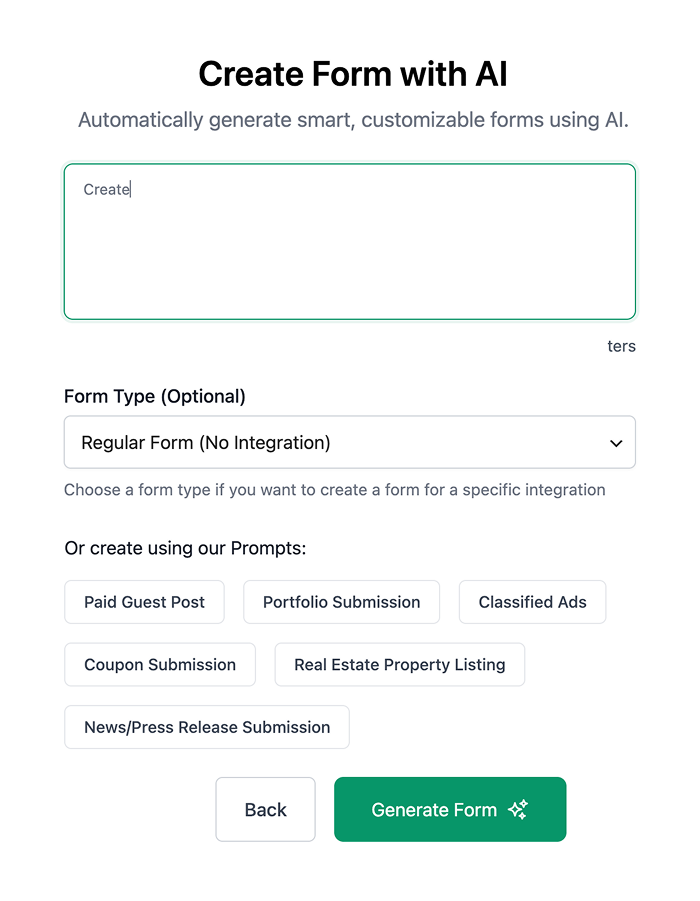
Open User Frontend then Post Forms, describe the form, and AI drafts it.
Real WPUF Fields
Drafts use the same field types you get in the manual builder.
Post Type Ready
Forms submit real posts, so entries arrive as drafts or published content.
- Pro
Generate Registration Forms With AI
Pro extends the AI builder to registration forms, so new signup flows take one sentence too. Also, this works on any paid plan, starting with Personal.
Turn One Sentence Into Published Content
Your AI-generated form creates real WordPress posts from the frontend, so submissions turn into published content.
Real Post Output
Submissions become WordPress posts, not just entries in an inbox.
Any Post Type
Point the form at posts, pages, or your own custom types.
Guest Friendly
Pair it with guest posting so visitors submit without accounts.
Monetization Ready
Charge per post, or sell access with subscription packs.
Free to Use
AI post form generation ships in the free plugin.
Full Control After
Open the draft in the builder and adjust any field.
See Who Uses the AI Form Builder
Here are four kinds of teams that trade builder time for publishing time every week.
Frequently Asked Questions
The answers people ask for before turning on the AI builder.
Is the AI form builder free?
Can I edit the generated form?
Which fields can AI use?
Does it work with guest posting?
Where do the AI settings live?
Do I need coding skills?
Build Your Next Form With One Sentence
Start free with WP User Frontend and let AI handle the first draft.