Your post and registration forms stay short for every visitor, and each rule takes one toggle and two dropdowns inside the same drag-and-drop builder.
Add Conditional Logic to Any WPUF Form
Every extra field costs you a submission. Show only what applies to each visitor, and the rest gets out of the way.
Fewer Drop-Offs
People meet a short form, so more of them reach the submit button.
Cleaner Submissions
Nobody types filler into a field that has nothing to do with them.
One Form for Everyone
Ask twenty questions across all your users while each person answers only five.
No Code Needed
You set each rule from the field editor, so nobody has to touch PHP.
Quick to Set Up
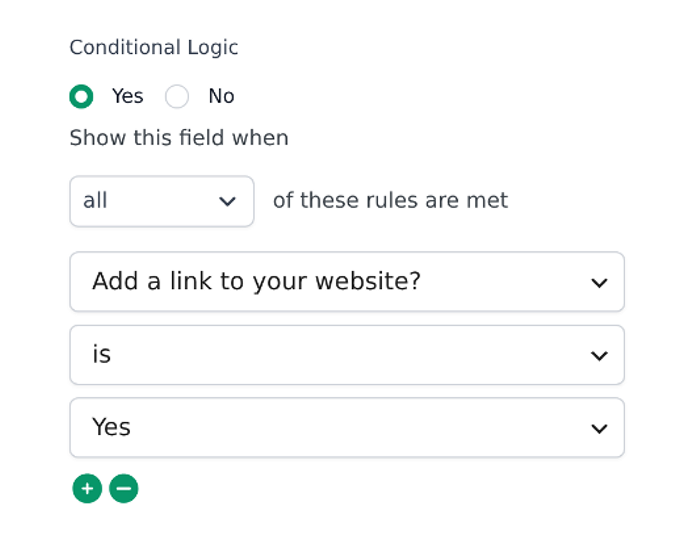
Flip the setting to Yes, pick a field, pick an answer, then save.
Live on the Frontend
Your visitors never need admin access, because the rules run on the page.
Set Rules From the Fields You Already Use
Every custom field in the Pro builder carries its own show-and-hide setting.
- Pro
Choice Field Triggers
Point a rule at a radio field, then match one of the options you listed.
- Pro
Show or Hide Fields
A field waits out of sight until the answer you picked comes back.
- Pro
Sections and Pages
Rules cover sections and pages too, so whole blocks of a form move together.
- Pro
Branch Signup as Well as Posting
Each user field element in the registration and profile builder carries the same setting, so a signup form can split by member type before the account is ever created.
One Rule Set, Every Form Type
Conditional logic works the same way across post forms, registration, and profile editing.
Post Forms
Rules shape the submission that turns into a live post on your site.
Registration Forms
User field elements carry the same Yes setting, so signup can split.
Profile Editing
One form covers signup and the profile, so rules follow the member.
Any Post Type
WPUF forms work for any post type, and rules travel with the form.
Multistep Forms
Whole pages can drop out, so a long form still feels short.
Plain Dropdowns
Two dropdowns in the field editor set a rule, and that is it.
Put Conditional Logic to Work
Four setups where one form has to serve people who need different things.
Frequently Asked Questions
Everything you need to know about conditional logic in WP User Frontend.
Is conditional logic available in the free plugin?
Which field types can trigger a rule?
Can a rule hide a whole section or page?
Does conditional logic work on registration forms?
Stop Building One Form for Everyone
Set your first rule in the field editor today, and let WP User Frontend show each visitor only what applies to them.