Writers pay from the submission form itself, so the post waits until the money clears, and setup takes two checkboxes and a price.
Earn from Pay Per Post Without Extra Plugins
Every piece runs inside User Frontend, so there is no cart plugin and no manual invoice.
Fast Setup
Two checkboxes and a number turn any post form into a paid form.
No Cart Plugin
Payments run inside the plugin, so you skip WooCommerce and Easy Digital Downloads.
Fewer Junk Drafts
A price filters out weak pitches before they reach your review queue.
Money First
The post waits for payment, so nobody publishes and then goes quiet.
Block Editor Ready
Drop a paid form into any page with the Post Form block.
Two Pricing Models
Charge a flat fee per post, or sell packs with posting limits.
Control Every Part of the Payment Flow
Real settings inside the form builder, not a bolt on payment add-on.
Per Form Pricing
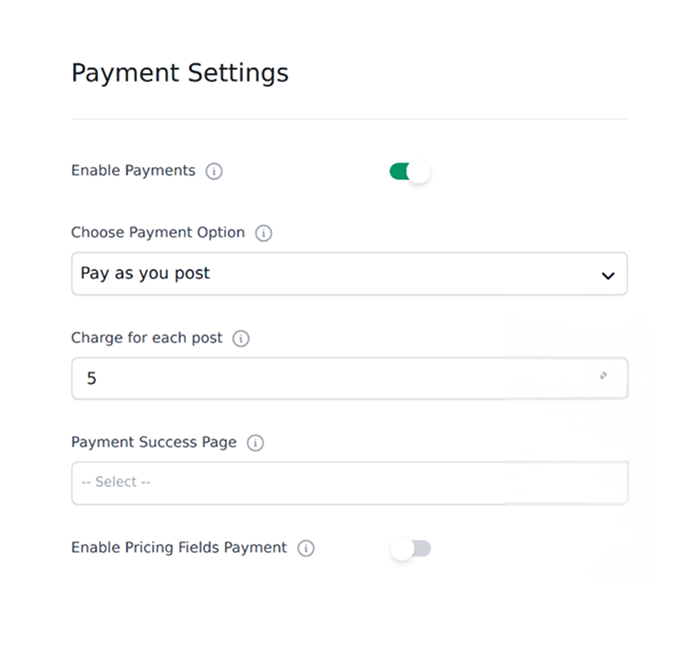
Turn on Pay Per Post for one form, then set the amount in Cost Settings.
Gateway Choice
Take PayPal or offline bank transfer, both included in the free plugin.
Transaction Records
Every payment lands under User Frontend then Transactions with its amount and status.
Force a Pack, or Fall Back to Pay Per Post
Require a subscription pack for posting, then charge a fallback per post fee when a writer has no pack or runs out of submissions.
Add Coupons, Invoices, and Tax with Pro
Pro turns a working payment form into a real billing setup.
- Pro
Discount Coupons
Hand out codes, then read the coupon and discount on each transaction.
- Pro
PDF Invoices
Invoices generate on their own and go out as PDF attachments.
- Pro
Stripe Checkout
The Stripe module adds card payments next to PayPal.
- Pro
Pricing Fields
Charge for extras with pricing radio, checkbox, dropdown, and cart total fields.
- Pro
Regional Tax
Country and state tax rules apply to each payment.
- Pro
Post Expiration
Paid posts come down on schedule, set by form or by pack.
See Pay Per Post at Work
Four sites that charge on submission and what each one turns on.
Frequently Asked Questions
The eight questions that come up most often before you launch.
Can I charge for post submissions in the free plugin?
Do I need WooCommerce or Easy Digital Downloads?
What happens to the post before payment clears?
Can I set a different price on each form?
Can guests pay without registering first?
Where do I see what writers paid?
Can I offer a discount code?
Do I need to write any code?
[wpuf_form id="123"] and list your subscription packs with [wpuf_sub_pack].Start Charging for Post Submissions Today
Install the free plugin, price your first form, and take the payment before the post goes live.